In this article:
How to Update your Personal Details
How do I change the name on my account?
Changing your Country of Residence
Do you want to update your marketing preferences?
How to Update your Personal Details
Paddy Power takes your personal details at the point of registration, but you can update these yourself at any time. It is advised that you keep this section up-to-date should we ever need to contact you.
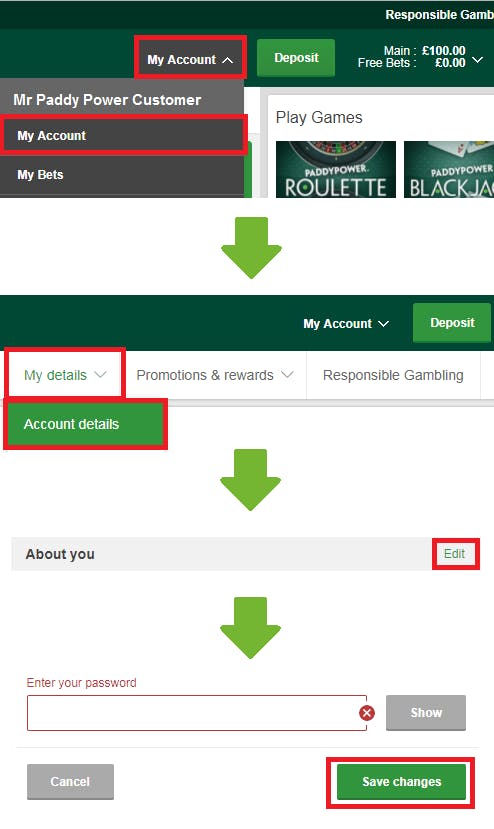
If you want to update your Personal Details on a mobile, click here. If you want to update your Personal Details on desktop just follow these simple steps:
- Step 1. Log into your Paddy Power account.
- Step 2. From the top right of the page select 'My Account' and then 'My Account' from the drop down.
- Step 3. Select 'My Details' from the navigation bar at the top of the page. In the following drop down, select 'Account Details'
- Step 4. Locate the details you would like to edit, find the title at the top of that section and select 'Edit'.
- Step 5. Enter your password at the bottom of the section and select 'Save changes'.
How do I change the name on my account?
If your name has changed due to marriage, a civil partnership, or following a divorce, we'll need some documentation to update your account.
To request a name change, please contact our Customer Service Team. They'll let you know exactly what's needed and guide you through this.
To help us process your request as quickly as possible, please have the following documents ready...
If you've taken a new name (e.g. marriage or civil partnership):
- A valid form of photo ID showing your new name, and
- A supporting document confirming the change - one of the following:
- Marriage certificate
- Civil partnership / Civil union certificate
- Deed poll or change of name deed
If you're returning to a previous name (e.g. after divorce):
- A valid form of photo ID, and
- Your original marriage or civil partnership certificate (to link your names), and
- Your divorce or dissolution document
If you're unable to provide a supporting document confirming your name change, you'll need to provide a second valid form of photo ID showing your new name.
Changing your Country of Residence
If you've moved to a different country, please contact our Customer Service Team. They'll guide you through the next steps and any documentation is required.
Do you want to update your marketing preferences?
For information on how to update your marketing preferences, read our article here.